Phone Tracker GPS Tracker
- 4.2
- Rating
- 100.00K
- Installs
- Free
- Price
 Analysis by App-foxy
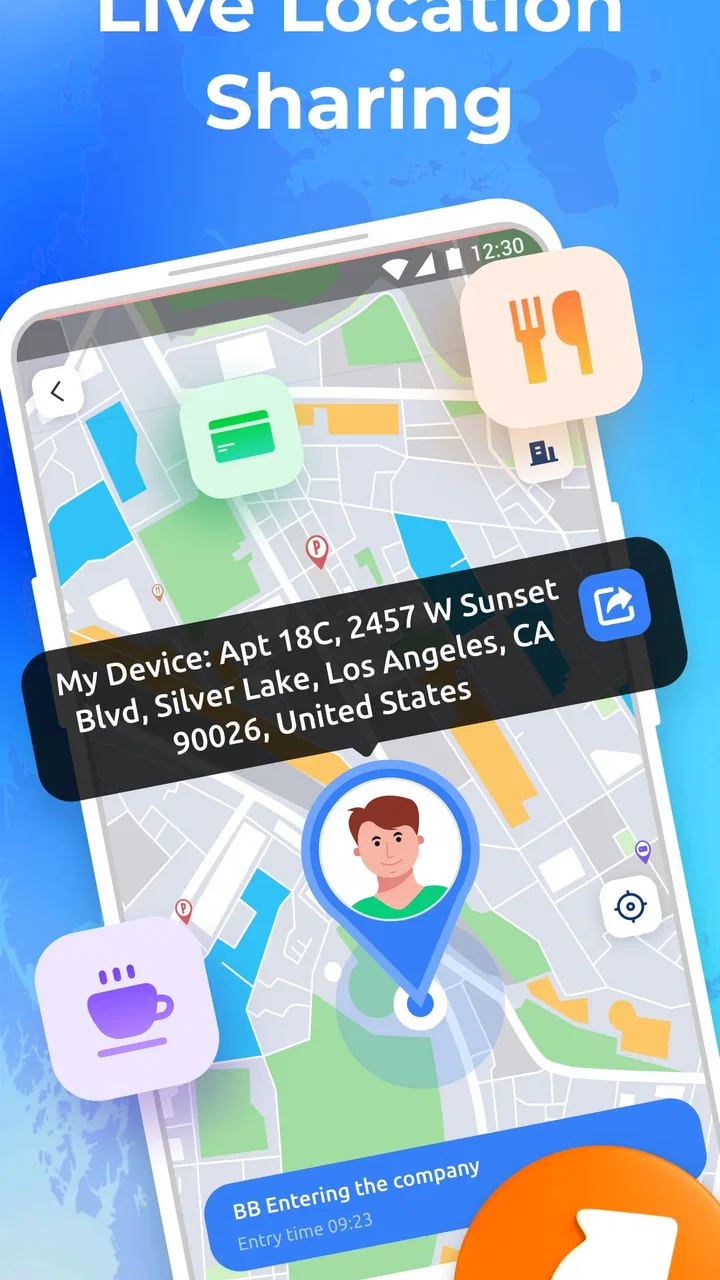
I approached Phone Tracker GPS Tracker as a practical question rather than a novelty: would I actually want it helping me keep track of a person’s location during an ordinary day? The answer depends less on the label “Phone Tracker” and more on the situation. Teadev’s app sits in the Maps & Navigation category, is free to use, and focuses on private location sharing, live GPS visibility, and safety alerts. That makes it more relevant to families, couples, friends traveling together, and anyone who wants a simple location check-in tool without turning navigation into the main event.
My first impression is that the app is aimed at reassurance. It is not presented as a broad travel planner or a replacement for a full-featured map service. Its value comes from helping people share where they are and notice when something may need attention. That narrower purpose is important, because a focused safety tool can be easier to understand than an app packed with route planning, public places, traffic layers, social feeds, and other distractions.
At the same time, location sharing is personal. I would only use it with clear agreement from the people involved. A tracker should support trust, not quietly undermine it. Used openly, Phone Tracker GPS Tracker can make a meeting point, a long trip, or a late arrival easier to manage. Used as a way to monitor someone without their knowledge, it becomes the wrong tool and the wrong habit.
You May Also Like

 Blood Strike: 2.5 Anniversary
Blood Strike’s Loadouts Turn Every Drop Into a Tactical Gamble
A close look at Blood Strike’s custom loadouts: how fast access to signature weapons reshapes its battle royale rhythm, rewards preparation, and narrows the gap between fights.

 Pandora - Music & Podcasts
Pandora’s Music Is Easy to Start, but Harder to Recover
Pandora’s strength is its low-effort path from a seed to a station. Its weak spot is how much confidence it asks you to place in connection, setup, and quiet recovery.

 8 Ball Pool
 Is Built on Rivalries, Rematches, and Routine
A close look at the rivalries, rematches, shared routines, and unanswered safety questions that turn a quick pool match into a persistent mobile community.

 Samsung Music
’s Quiet Strength Is Playing What You Already Own
Its reach comes less from spectacle than from dependable access to a personal library. That simplicity is both the app’s strongest retention engine and its ceiling.

 AccuWeather: Weather Radar
AccuWeather Review: A Quick, Clear Forecast for Everyday Decisions
For everyday plans, the best forecast is the one you can understand quickly. AccuWeather makes rain timing, radar, and local conditions easy to act on, with a few trade-offs.

 Hill Climb Racing
Why Hill Climb Racing Still Turns Crashes Into One More Run
A tiny car, a bumpy hill and one more upgrade: Hill Climb Racing keeps resurfacing because its simple chaos makes every near-miss feel personal.
More From Our News Desk



What I would consider before choosing it
I’d start by asking whether the people I want to coordinate with would welcome a dedicated location-sharing routine, rather than treating installation as the whole decision. In this section, I’d weigh the practical setup against the group’s habits and agree on a clear reason to share. That makes it easier to judge the app’s strongest use cases next.
The real decision is about purpose, not the word “GPS”
Before installing it, I would ask what problem I am trying to solve. If I need turn-by-turn directions, a conventional navigation app is likely the better fit. If I want to see whether a family member has reached an agreed destination, or to share my own position during a journey, this app’s focus makes more sense. The distinction saves time: Phone Tracker GPS Tracker is most useful when the location itself is the important information.
I would also decide who needs access and when. A small group going to a concert might share locations only for the journey and the walk back. A family might use it more regularly for arrival checks. Those are different routines, and the best experience will come from agreeing on them before anyone starts looking at a map. I find that a simple rule—share when traveling, stop sharing when the situation is over—keeps the feature useful without making it feel intrusive.
Another decision point is how much urgency I need. Live location is helpful when people are moving, while safety alerts matter when a normal plan changes or someone may need attention. I would not treat an alert as proof that an emergency is happening. It is a prompt to check the situation, contact the person, or use a more direct emergency channel when appropriate. That distinction is easy to overlook, but it is central to using any safety-oriented tracker responsibly.
Setup expectations and everyday handling
Because the app is free and carries an Everyone content rating, it is approachable for a wide range of users. It supports devices running Android 7.0 or later, which covers many older phones as well as newer ones. I would still make sure the people in my sharing circle are comfortable with the setup before relying on it for something important. A location tool is only useful when everyone knows how the arrangement works.
I would test it during a low-pressure trip before depending on it for a late-night journey or a long-distance meeting. For example, I might share my position while walking from a station to a café, ask the other person to confirm they can see it, and then end the session once we meet. That small rehearsal can reveal practical friction, such as someone forgetting to enable sharing or not understanding what an alert means.
Battery and connectivity are also part of the decision, even when an app is designed around live GPS. A phone with a nearly empty battery, poor reception, or restricted background activity may not provide the smooth experience people expect. I would charge the phone before a trip, keep mobile data available, and avoid treating a map screen as a substitute for a phone call. These are not reasons to reject the app; they are reasons to use it as one layer of a safety plan rather than the entire plan.
A realistic example from an ordinary day
Imagine I am meeting a friend after work in an unfamiliar part of town. We agree to share our locations while traveling because the venue has several entrances and the area will be busy. I can check whether my friend is still on the way instead of sending repeated “Where are you?” messages. If one of us stops unexpectedly, the other has a useful clue that it may be worth calling.
The important detail is that the app does not remove the need for communication. We still choose a meeting place, decide what to do if one person loses signal, and agree to stop sharing afterward. In this scenario, Phone Tracker GPS Tracker reduces coordination effort without pretending to solve every travel problem. That is the kind of modest, practical benefit I value most.
Where Phone Tracker GPS Tracker stands out
What appeals to me most is a focused role: helping a small, consenting group coordinate around live whereabouts and safety prompts, instead of asking a general map to do everything. I’d look at whether that narrow purpose makes an outing or arrival check-in easier to manage. The next section considers when the same focus may feel too limited.
A focused approach to private sharing
The strongest part of the app’s identity is its combination of private location sharing and live GPS. Instead of asking users to navigate a large ecosystem, it puts attention on the people who have chosen to share their whereabouts. For me, that focus is useful when I want a clear answer to a simple question: where is the person I am coordinating with right now?
The best reason to choose it is its narrow, safety-minded purpose. A focused app can make a temporary sharing routine easier to explain to a less technical relative or a friend who does not want another complicated social platform. I would be more comfortable introducing it as a practical travel aid than as an app for constant observation.
The private aspect also changes how I would use it compared with public map features. Public mapping tools are excellent for finding roads, businesses, transit information, and directions. They are not necessarily designed around a small, trusted circle checking in with one another. Phone Tracker GPS Tracker is more appealing when the relationship between the people sharing matters as much as the map itself.
Safety alerts are useful when treated as prompts
Safety alerts can add value because they shift the app from passive viewing toward awareness. I would use them as reminders to pay attention, not as an automatic diagnosis of danger. If an alert appears, my next step would be to check the map, contact the person, and consider the context. A delayed arrival, a dead battery, or a route change can look concerning without being an emergency.
This is one of the less obvious trade-offs: alerts can reduce worry when they match an agreed plan, but they can create unnecessary anxiety when nobody has discussed what they mean. Before using the feature with family members, I would explain which situations should lead to a call and which can simply be ignored. That small conversation makes the technology calmer and more useful.
It works best as a shared routine
Location sharing is not something I would install only on my phone and expect to work magically. Its usefulness depends on the people involved accepting the same routine. I would create a clear start and end point for sharing, use names or descriptions that everyone recognizes, and avoid keeping a session active after the reason for it has passed.
A particularly useful workflow is temporary coordination: start sharing before leaving, check progress during the journey, and close the arrangement after arrival. This is better than leaving location access running indefinitely simply because it is convenient. It also gives users a way to enjoy the app’s practical strengths while keeping control over when their whereabouts are visible.
What the current version suggests for potential users
The current version is 1.0.12, and the app was released on January 30, 2026. I would view it as a relatively focused product rather than a mature all-purpose navigation suite. That does not make it unsuitable, but it does affect how I would evaluate it: I would prioritize whether the central sharing and alert workflow feels clear, rather than expecting the depth of a long-established mapping platform.
Its public reception is very positive, with a 5.0 average from 51 ratings and 3 reviews. I see that as encouraging, but not as a complete picture of every phone model, network condition, or family setup. A small review sample can show that early users are happy while still leaving plenty of real-world situations untested. I would try it personally before making it the only location tool for an important trip.
Small habits that improve the experience
My first tip is to test the app while both people are stationary and then while one person is moving. That separates account or sharing confusion from ordinary signal and positioning changes. My second tip is to agree on a backup contact method before leaving. If the phone loses power, a location screen cannot replace a call, text, or a prearranged meeting point.
My third tip is to avoid checking constantly. Live location can become a source of stress when someone refreshes it every few minutes and interprets every pause as a problem. I would use it at sensible moments—before departure, near the destination, or after an alert—while allowing the traveler to focus on the journey.
Finally, I would make privacy part of the routine. Everyone should know who can see the location, why sharing is active, and when it will end. This is not just good etiquette; it helps prevent the app from becoming an unwanted background presence in daily life.
When a different kind of app may fit better
I’d choose a different option if the main need were detailed directions, place searches, or a sharing method everyone already uses comfortably. The key trade-off is whether a separate tool improves coordination enough to justify adding another routine. With that in mind, I’d compare its role with broader navigation and familiar phone-based alternatives.
Traditional navigation apps remain better for directions
If my main goal were finding the fastest route, comparing roads, locating a business, or planning a multi-stop drive, I would choose a conventional navigation app. Those tools are built around maps as a destination and routing service. Phone Tracker GPS Tracker is better understood as a people-and-safety layer, not as my only source of travel information.
That difference matters for travelers. Someone visiting a new city may need public transport details, walking directions, road conditions, and place searches all at once. A dedicated map service will usually be more natural for that job. I would use Phone Tracker GPS Tracker alongside it when sharing my position with a companion adds value, rather than asking it to replace every mapping function.
Built-in phone sharing may be simpler for some groups
Some users already rely on location sharing built into their phone ecosystem or messaging habits. If everyone in a group is comfortable with that existing method, switching to a separate app may not be worthwhile. The advantage of Phone Tracker GPS Tracker is its focused identity, but focus is not automatically better when a group already has a familiar, trusted workflow.
The choice comes down to friction. If adding another app makes relatives less likely to share their location when needed, the supposedly more specialized option may be less useful in practice. On the other hand, if built-in sharing feels scattered across different services and the group wants a dedicated safety-oriented tool, this app can provide a clearer purpose.
Emergency services are not replaced by a tracker
I would be especially careful not to confuse safety alerts with professional emergency response. When someone faces immediate danger, the correct action is to contact local emergency services or a trusted person who can intervene. A tracker can provide context and help people coordinate, but it should not be treated as a guaranteed rescue system.
This is also where the app may not be right for someone seeking formal monitoring, clinical support, or a specialized service for vulnerable users. Those needs require carefully designed systems and human procedures beyond a general location-sharing app. Phone Tracker GPS Tracker makes more sense for everyday coordination and voluntary sharing between people who understand the arrangement.
The cost of switching is mostly social and practical
Since the app is free, the main cost of trying it is not a subscription decision. It is the effort of getting the right people to install it, understand the sharing process, and agree on boundaries. That effort is small for a couple or a group of friends, but it can be more noticeable in a family where some members are uncomfortable with location technology.
I would reduce that friction by introducing one use case at a time. Rather than asking everyone to share permanently, I would suggest using it for a single outing. Once the group sees how live location and alerts fit into a normal plan, it becomes easier to decide whether regular use is worthwhile. If nobody wants the routine after that trial, switching back to calls or an existing map service is simple enough.
The app has more than 10K installs, which indicates that it has reached an initial audience while remaining much smaller than the major mapping platforms. For me, that reinforces the idea that it should be judged on the quality of its central workflow, not on the breadth of a giant ecosystem. A smaller audience is not a flaw by itself, but it does make personal testing more important before relying on it for a critical situation.
My recommendation after weighing the trade-offs
I recommend Phone Tracker GPS Tracker to people who want a straightforward way to share location privately during trips, meetups, family check-ins, or situations where a safety alert could prompt a timely call. I especially like the idea of using it temporarily, with a clear reason for sharing and a clear endpoint. That keeps the app helpful without turning location visibility into an automatic expectation.
I would skip it if I mainly need detailed navigation, public transport planning, business search, or a complete travel map. I would also skip it if the people involved do not freely agree to share their locations, because no technical convenience is worth creating pressure or suspicion. In those cases, a normal map app, a messaging service, or a simple call may be the more appropriate choice.
Teadev has made a free Maps & Navigation app for a specific kind of problem: keeping trusted people connected through live GPS and safety-oriented notifications. The Everyone rating makes it approachable, and the positive average is a welcome sign, but I would still test the workflow under ordinary conditions before depending on it for something serious. My final view is favorable with one condition: use it as a transparent coordination tool, not as a substitute for judgment, consent, communication, or emergency help.
For my own use, I would keep it available for planned journeys and temporary check-ins. It earns a place on a phone when it reduces repeated messages and gives a group a shared view of progress. It does not need to do everything to be worthwhile. Its success depends on whether its focused purpose matches your routine—and whether everyone using it feels safer and better coordinated rather than watched.
FAQs for Phone Tracker GPS Tracker
01How accurate is the Phone Tracker GPS Tracker?
The Phone Tracker GPS Tracker is designed to provide highly accurate location data using GPS technology. However, accuracy can vary depending on factors such as signal strength, environmental conditions, and device settings. Typically, it offers accuracy within a few meters, but users should be aware that occasional discrepancies might occur.
02Is my data secure with the Phone Tracker GPS Tracker?
Yes, the app prioritizes user privacy and data security. It uses encryption to protect your location data and personal information. Additionally, the app complies with industry standards and regulations to ensure that your data is not shared without your consent. Always review the privacy policy for more details.
03Does the app drain battery quickly?
While GPS tracking apps can consume more battery than typical applications, Phone Tracker GPS Tracker is optimized to minimize battery usage. It employs smart algorithms to reduce power consumption when possible, but users may notice a moderate impact on battery life during extended use.
04Can I use the Phone Tracker GPS Tracker offline?
The app requires an internet connection to update location data in real-time. However, it can still operate in offline mode by storing GPS data locally until a connection is re-established. This ensures continuous tracking even in areas with poor network coverage, though updates will be delayed.
05Is the Phone Tracker GPS Tracker compatible with all devices?
The app is compatible with most Android and iOS devices. It requires a device with GPS functionality and a supported operating system version. For the best experience, check the app store for specific compatibility details related to your device, as older models may have limited functionality.
Pros
- Accurate real-time location tracking.
- User-friendly interface for easy navigation.
- Battery-efficient
- minimal drain.
- Customizable alerts for location changes.
- Works well in low-signal areas.
Cons
- Requires constant internet connection.
- May raise privacy concerns.
- Limited features in free version.
- Occasional GPS signal loss.
- Some ads in the free version.

Phone Tracker GPS Tracker
Gallery